You want the delta executor download for Android without landing on a mirror that repackages malware into the APK. Fair instinct this query is one of the most cloned page types in the niche. The real file lives in one place, comes in two builds, and installs in about five minutes if you know one Android setting and one warning screen. This page is the platform-wide install pillar: which build your phone needs, what Play Protects popup actually means, and honest answers for the PC and iPhone searches that usually end on scam pages.
An Android APK from delta-executor.com currently v2.732 in two builds: standard and ARM32. It’s free, and the first launch opens a key window, which is the ad-funded monetization, not a paywall. There is no Play Store listing and no native PC executable. Everything wearing those names is redistribution or invention. That single fact filters out most of the traps before you read another word.
Table of Contents
Why isn’t Delta on the Play Store and does that make it untrusted?
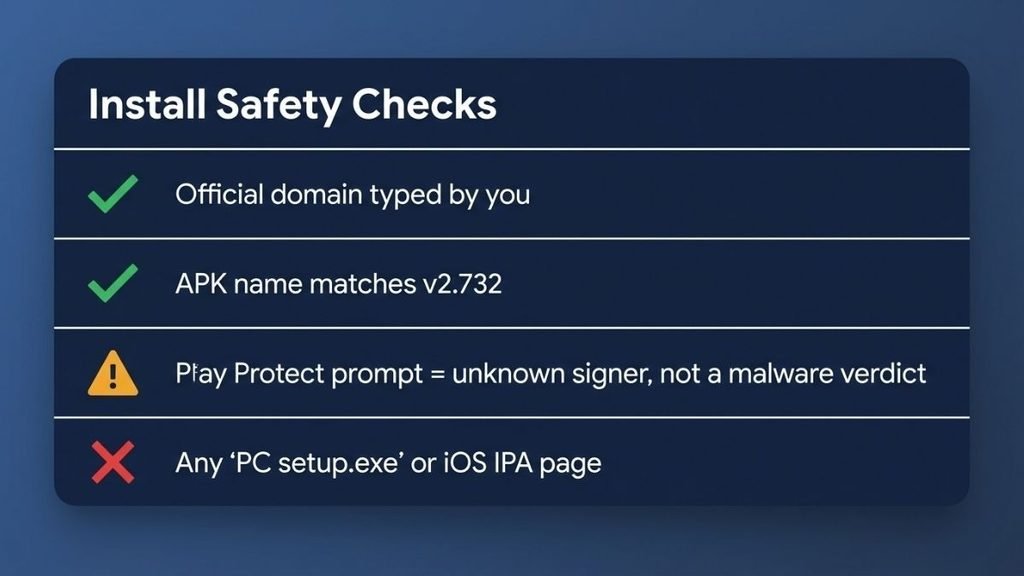
Google’s policy bars apps that modify or inject into other apps, so every executor on Earth lives outside the Store. Sideloading isn’t a red flag here; it’s the only distribution channel the category has. The Reddit thread asking whether Delta is “safe when downloaded off the app store” has it backwards there is no on-Store version to compare against. So trust can’t rest on a Store badge. It rests on three checkable things: the domain you typed yourself, an APK whose file name matches the version the official page advertises, and a scan consensus showing heuristics rather than malware families. Our flag decoder explains that last line in detail. Closed-source code can never be fully audited by outsiders anyone promising more certainty than that is selling something.
Delta executor download for Android: step by step
1. Type the official domain yourself
delta-executor.com, from your own keyboard. Ad results and “fast APK” buttons are the trap layer.
2. Pick your build
Standard for most phones; ARM32 if your device is older and 32-bit. Same version number, different architecture.
3. Scan the file before installing
Upload the APK to VirusTotal. One or two HackTool-style heuristic flags are expected on injectors; a consensus of Trojan or Stealer names means delete, regardless of source.
4. Allow unknown sources, then install
Settings install unknown apps your browser. Tap the downloaded file and confirm. Play Protect may comment the next section explains what that popup is worth.
5. First launch: clear the key window
The key prompt is normal. The key guide walks the Lootlink/Lootlabs/Linkvertise tasks; ad-blocking off makes them register.
💡 Tip: Bookmark the official download page on day one. Every future update then starts from a source you already verified.
⚠️ Warning: An APK that asks for your Roblox password inside its own login box is stealing it. Delta spawns the real Roblox login; it never needs your raw credentials.
Standard or ARM32: which build does your phone need?
Standard, unless the standard build crashes on launch then ARM32. The crash pattern is the reliable tell: a 64-bit package on a 32-bit device fails immediately, every time. The official page publishes both at the same version number, so you’re choosing architecture, not features. Storage cost is trivial; the real resource draw is battery once the overlay runs in-game. If a build number newer than v2.732 appears, our update post explains what the bump means before you reinstall.
What about PC and iPhone?
PC: there is no native delta executor for pc no setup.exe, no installer. The only desktop path is an Android emulator running the official APK, and the same source rules apply inside it. Every “Delta PC download” page is serving something else, usually malware with a familiar name.
iPhone: no APK exists for iOS. Delta documents a separate, narrower iOS route; anything offering an “IPA” or a configuration-profile install is a scam page harvesting data or selling fake steps. Ban risk on the documented iOS route matches Android; virus risk lives in the scam pages, not the route.
Install problems — the three that actually happen
Play Protect blocks the install. Unknown signer, not known malware the popup is absence of evidence, not a verdict. Fix: proceed only if the file came from the official domain and your scan shows heuristics-only flags. The file downloads as a zip or an ad app. You’re on a mirror, not the official page. Fix: type the domain yourself and start over. Installs fine, crashes on first open. Architecture mismatch. Fix: uninstall, install the delta executor arm32 build from the same official page.
The disclaimer, plainly
Install mechanics are education, not endorsement. Executors violate Roblox’s Terms of Use, mirrors add malware and credential-theft risk, and the ban range comes from Delta’s own documentation. This article is for educational and informational purposes only. We do not encourage or endorse the use of exploits in Roblox. Use at your own risk. Delta Executor is not affiliated with Roblox Corporation.
Final take
The whole download is one rule wearing five steps: the address bar is your security tool. Type the domain, match the version, read the scan names, and treat every faster-looking shortcut Store myths, PC installers, iOS IPAs as the trap layer it is. From here the cluster hands you forward: key tasks, then your game’s setup guide. Hit a popup this page didn’t predict? Describe it in the comments install weirdness is exactly what the next revision should cover.
Quick answers
Is Delta Executor a trusted app? It carries no Store badge and no public audit, so trust here is checkable, not granted: typed domain, matching version number, heuristics-only scan consensus. That’s the honest standard for any closed-source sideload.
Is the Delta app safe to use? Malware risk is lowest from the official source; ban risk is the documented 1-day-to-permanent range. The full three-part verdict lives in our safety page.
Can Roblox detect executors? Yes client checks, server behavior analysis, and player reports. The mechanics breakdown explains each layer.
Are Roblox executors legal? For players, a Terms of Use breach rather than a crime in most countries. Sellers sit in a riskier category.
Is Delta safe for PC? The emulator path is as safe as its source APK; the fake “PC setup.exe” pages are not safe at all, because they aren’t Delta.
Does Delta work on an iPhone? Not as an APK. The documented iOS route is separate; IPA and profile pages are scams either way.
Pingback: Blox Fruits Script Delta Executor: Full Guide (Sep 2026)