A red popup mid-download: “Trojan found” or “Blocked for your protection.” Your stomach drops, then the doubt: is delta executor a virus, or is your antivirus crying wolf? Both happen in this niche, and telling them apart is the whole skill. This page explains what each warning label actually means, how to read a scan report line by line, and the handful of situations where the scary popup is telling the truth. And we’ll be straight about the limits: Delta is closed-source, so nobody outside its developers has audited the code including us.
Table of Contents
Is Delta Executor a virus? The short answer
No — not in the technical sense, for the official build. A virus self-replicates and spreads; Delta is an injector, a tool that runs unsigned Lua inside Roblox sessions. Security vendors classify tools like this as hacktools, not malware.
But “not a virus” is not “risk-free.” Delta comes from an anonymous team with no public source code, so independent audit doesn’t exist we haven’t audited it, and neither has your antivirus. What can be checked is scan consensus, behavior reports, and the publisher’s own documentation, which openly warns about bans.
That’s the evidence base here. It’s also the standard worth demanding from anyone including us who offers you a definite answer about delta executor malware in either direction.
Why does your antivirus flag Delta Executor?
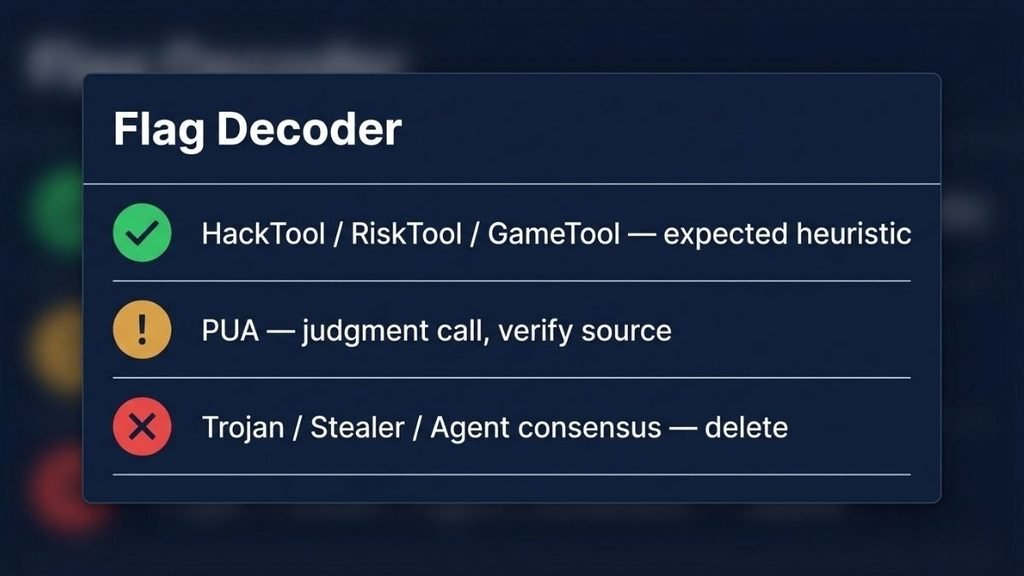
Because injectors behave like malware even when they aren’t. Delta writes into another process’s memory the same technique trojans use so engines label it on heuristics. The label names tell you which kind of warning you’re holding:
- HackTool / RiskTool / GameTool — “this is a cheat or utility; your call.” Expected on executors.
- PUA — “potentially unwanted app.” A judgment call about bundling and ad behavior, not an infection claim.
- Trojan / Stealer / Agent — malware family names. These are the alarms.
One or two heuristic labels on an executor is normal noise. A consensus of family-named detections from multiple major engines means something different entirely — and it’s the pattern you should actually act on. Why does my antivirus flag delta executor, then? Most of the time: heuristics recognizing injection behavior, not an infection.
How to read a VirusTotal report five checks
A scan report is only as good as your reading of it. Five checks, in order:
1. Scan the exact file you’ll install
The report applies to one hash. A report about “Delta v2.732” somewhere online says nothing about the file on your phone.
2. Read detection names, not the count
Three engines saying HackTool is quieter than one saying Stealer. Names carry the meaning; totals don’t.
3. Weight the engines
Consensus among major, named engines matters. A pile of no-name detections can be shared signatures echoing one vendor’s heuristic.
4. Check the behavior summary, if present
Sandbox tabs show what the file did: network calls, dropped files, credential access. Behavior beats reputation.
5. Look at submission history
A file first submitted last week from a mirror, with no community history, deserves more caution than one with months of consistent reports.
The decision rule: heuristic-only flags plus the official source means proceed with eyes open. Any family-named consensus means delete, regardless of where the file came from. If you need the clean file to compare against, the safe download path is documented in our 99 Nights guide.
Play Protect blocked the install — what that means
Usually “unknown signer,” not “known malware.” Play Protect blocks apps it can’t vouch for, and sideloaded executors are unvouchable by definition. The block is absence of evidence, not evidence of danger.
“Install anyway” is a reasonable choice when the file came from the official page and your scan shows heuristics only. It’s a poor one when the file arrived through a mirror, or the scan shows family-named consensus. Same button, opposite situations the difference is everything you checked in the five steps above.
When the “virus” warning is real
Almost always when the file isn’t the official build. Mirrors and delta executor a virus apk style downloads are where repackaged payloads live: bolted-on adware, fake login boxes that harvest your Roblox password, or genuine stealers wearing Delta’s name.
So a delta executor virus download warning can be simultaneously wrong about Delta and right about your file. The app name tells you nothing; the packager tells you everything. Our Delta VNG breakdown shows what those repackaged edits actually contain, and the Discord guide covers the same scam family in chat servers.
Flag problems the three that actually happen
My antivirus quarantined the APK. A heuristic trigger did its job on a hacktool. Fix: delete the quarantined copy, re-download from the official page, re-scan, and install only if the flags are heuristic-only.
Scans were clean for months; now it’s flagged. Either engine definitions updated, or the file you hold changed common with auto-updating mods. Fix: re-scan the current file and compare it against a fresh official download.
Reddit says virus; my scan says clean. Threads usually describe a different file a mod or mirror or ban frustration mislabeled as malware. Fix: treat threads as pattern hints, never as evidence; check what file the poster actually had.
Nothing here is encouragement. Executors violate Roblox’s Terms of Use, repackaged copies add real malware and credential-theft risk, and the ban range comes from Delta’s own documentation.
This article is for educational and informational purposes only. We do not encourage or endorse the use of exploits in Roblox. Use at your own risk. Delta Executor is not affiliated with Roblox Corporation.
Final take
The popup that scared you was probably heuristics doing their job on a hacktool or a mirror file that genuinely deserved the alarm. Same red window, opposite meanings, and the difference is source plus label type. We can’t audit Delta’s code and won’t pretend otherwise; what we can hand you is the reading skill, so the next warning gets decided by evidence instead of panic.
Paste your scan’s detection names (not the whole report) in the comments and we’ll tell you which bucket they fall in heuristic noise, judgment call, or real alarm.
Quick answers
Can Roblox scripts be viruses?
The Lua text itself runs inside Roblox’s sandbox, so a script isn’t a virus. The risk sits in where hubs send you next — download links and “required loaders” — and in the executor app itself.
Does Delta give you a virus on iPhone?
There’s no iOS APK at all. “IPA” and profile-install pages are scams that can lead to real malware or data theft; the documented iOS route carries ban risk, not virus risk.
Is Delta executor illegal?
For players it’s a Terms of Use breach, not a crime in most countries. The full legality breakdown lives in our safety verdict page.
Is Delta safe to download Roblox?
Delta doesn’t download Roblox — it injects into sessions. Downloading Delta itself is exactly as safe as its source: official page means a documented build; mirrors mean unaudited edits.
Is delta executor a hack?
Yes, in the gaming sense: an injection tool Roblox treats as cheating. That’s why detection and bans exist, entirely separate from the malware question.
Should I trust “delta executor virus” threads on Reddit?
As pattern hints, yes; as evidence, no. Most threads never name the file’s source, and mod horror stories get generalized to the official app.
Pingback: Delta Executor Download for Android: Safe Install (2026)