Grow a Garden Script Delta Executor: Full 2026 Guide
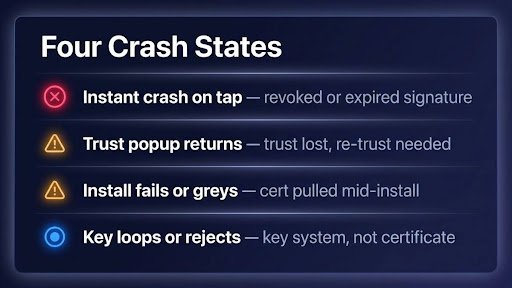
Your Grow a Garden script won’t run. It’s almost never the script — it’s the executor, or more often the key system sitting in front of it. That’s the real reason most people search for a grow a garden script delta executor setup: it’s the most common pairing on Android right now, and it’s full of small traps. Here’s how the setup actually works, what to fix when it breaks, and what you’re really risking. What is a Grow a Garden script on Delta Executor? Two parts, one job. The script is Lua code that makes the game do things the normal UI doesn’t allow — auto harvest, pet spawning, teleports. Delta Executor is the free Android app that injects and runs it. Delta’s site lists the current build as v2.732, with an ARM32 package for older 32-bit phones. Why is this pairing everywhere? Grow a Garden rewards time spent, and most players are on phones with no paid PC executor. A free Android executor plus an auto harvest script looks like a shortcut past all the waiting. Just know this: even Delta’s own site warns that running scripts can get you suspended for 1 day, 3 days, 7 days, or permanently. The publisher itself admits the risk. How to use a grow a garden script with Delta Executor — step by step Five steps. Most people stall at step three, so don’t skip it. 1. Grab the APK from the official site Head to delta-executor.com and grab it there — standard build and ARM32 build, both v2.732. Skip mirrors and “mod” APKs. A repackaged executor is a common malware delivery method, and you can’t see what’s inside the file. 2. Install it like any sideloaded APK Android blocks it until you allow “install unknown apps” for your browser in Settings. Tap the file, confirm, done. If the standard build won’t open on an older phone, the ARM32 package is the documented fallback. 3. Enter the game through Delta Open Delta, log into Roblox inside it, search for Grow a Garden, hit Play. Don’t open the regular Roblox app — the executor has to spawn the session itself. 4. Clear the delta executor key system This is where most people get stuck. Tap “Receive Key” and Delta copies a link to your clipboard. Paste it in a browser, complete two or three tasks through Lootlink, Lootlabs, or Linkvertise, and wait for “Unlock Content” to turn green. Then generate the key, copy it, paste it into Delta’s key window, and hit Continue. 5. Paste the script and execute Open Delta’s editor, paste the script, tap Execute at the bottom. One caution: don’t paste Lua you can’t vouch for. Pull scripts from a grow a garden script hub with a visible last-updated date, and check that it matches the current game build. 💡 Tip: Keys aren’t permanent. If the key window pops up again tomorrow, that’s not a bug — it’s how a free executor pays for itself. ⚠️ Warning: “No key, no ban” is marketing, not a technical claim. Detection happens game-side based on what the script does, not which key page you came through. What do Grow a Garden script hubs actually do? A hub bundles several features behind one menu. The ones you’ll see everywhere right now: Two myths worth killing. First, “no-key scripts are safer.” The key is just monetization — ad revenue for the executor’s developers. It has nothing to do with detection. Second, any “dupe method” video is expired on arrival. Dupes get patched fast, and the permanent bans that follow are documented all over the community. Does it work on iOS and PC? Delta claims Android, iOS, Windows, and Mac support — but there’s no native PC build, so desktop users run the Android app inside an emulator. iOS has its own install path and Linkvertise tasks. Android stays the smoothest route, since it’s what the executor is actually built for. The platform doesn’t change the bet. Same account, same risk — an emulator hides nothing from the game. Troubleshooting — the four problems people actually hit Delta crashes on Execute right after a Roblox update. The executor’s bypass lags behind client changes; every Roblox update can break it until a patch ships. Check the official site for a build newer than v2.732. Never sideload “fixed mod” APKs to solve this. The key system never unlocks. Ad blockers, private DNS, or skipped timers stop tasks from registering with Lootlink/Lootlabs/Linkvertise. Turn ad blocking off for the session, do the exact number of tasks shown, and let each timer finish. Script executes but nothing happens in game. A Grow a Garden update changed the game, and your script targets an older build. Check the hub’s last-updated date and pull a refreshed script. There’s no client-side fix for a stale one. Your account got suspended. Server-side detection flagged the session. There’s no reliable appeal for exploit-related suspensions. The honest fix: don’t run scripts on an account you’d be upset to lose. Is using Delta Executor on Grow a Garden safe? No version of this is safe the way videos claim. Executors violate Roblox’s Terms of Use, Grow a Garden’s developers suspend accounts, and Delta’s own site lists bans from 1 day to permanent as possible outcomes. Mirror APKs add a second risk: you’d be handing a repackaged file your Roblox login. This article is for educational and informational purposes only. We do not encourage or endorse the use of exploits in Roblox. Use at your own risk. Delta Executor is not affiliated with Roblox Corporation. Final take Setup isn’t the hard part — official APK, key tasks, paste, execute. Most of the friction is the ads and scripts breaking after updates. The risk is the hard part. Delta’s own site documents bans, and an account stacked with rare pets is exactly the kind of account that hurts to lose. We didn’t test these scripts on a device, so you won’t find fake “it worked perfectly on my
Grow a Garden Script Delta Executor: Full 2026 Guide Read Post »