Yesterday it launched. Today it crashes on tap, or the trust popup is back, or the key window loops no matter what you paste. Before you reinstall anything, know which failure you’re holding: delta executor ios certificate revokes and key system failures look identical from the outside and have completely different fixes. A revoke is a distribution control action Apple or the certificate issuer withdrawing signing permission not a virus alert and not a ban. This page is the repair manual: diagnose your crash state in ten seconds, fix it by install route, clean up old trusts safely, and learn what the iOS key system considers normal.
Table of Contents
What are delta executor ios certificate revokes, exactly?
A certificate revoke is Apple (or the signing provider) withdrawing permission from a signing certificate. Every app signed with that certificate stops launching, everywhere, at once which is why revokes hit whole communities in waves, not individual phones. Three things a revoke is not: not malware (your device isn’t infected), not a ban (your Roblox account is untouched), and not your fault. Enterprise certificates die when Apple pulls them; personal signatures from free Apple IDs expire on a seven-day schedule. Both outcomes look like “the app broke,” and both have the same five-minute fix loop, detailed by route below.
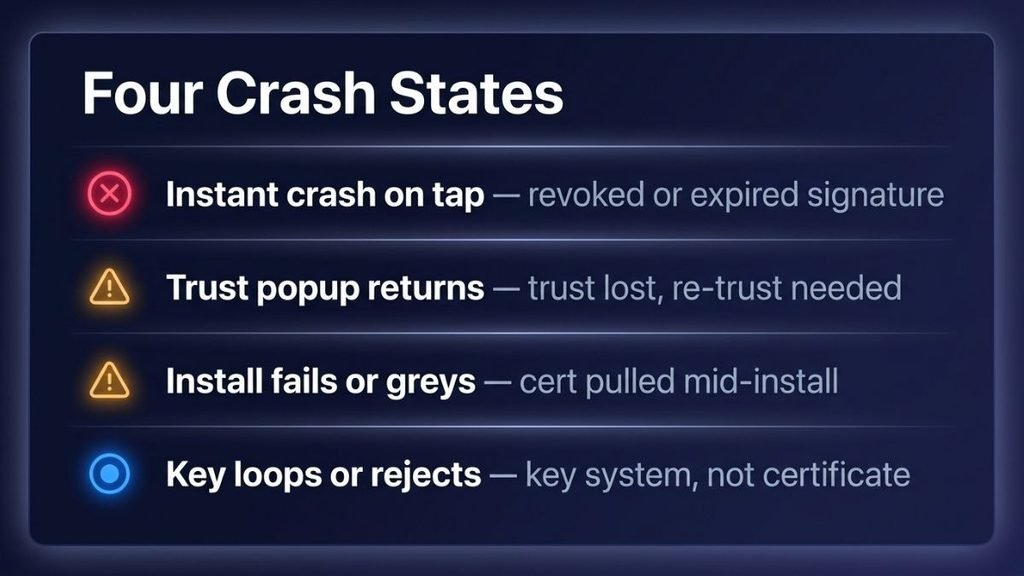
The four crash states diagnose yours first
Match your symptom before touching anything the fix depends entirely on which state you’re in:
- Instant crash on tap, after weeks of working. Revoked or expired signature. The app binary is fine; its permission to run is gone.
- “Untrusted Enterprise Developer” returns. Trust was lost new certificate after a reinstall, or iOS reset your trust settings during an update.
- Install button fails or greys out mid-install. The distribution host or certificate was pulled during your download. Network/DNS quirks produce the same symptom; both fixes are in the no-computer guide.
- Key window loops or rejects a correct key. Not a certificate problem at all this is the key-system side, and section 6 handles it.
Fixing a revoked certificate, by install route
Route A official Direct Install
Delete the dead app, then re-run the Direct Install flow from the official domain with the current build. When the trust popup appears again, re-trust through Settings General VPN & Device Management. Keeping the old dead install around changes nothing except clutter.
Route B — eSign or another signer
Re-signing is the fix: download the fresh IPA from the official site only, import it into your signer, sign, install, re-trust. Signing an old cached IPA re-attaches a possibly-dead certificate always pull the current file.
Route C AltStore or SideStore
This route self-heals if you let it: AltServer refreshes signatures while running, SideStore refreshes on-device. A lapsed seven-day window means opening the store app and refreshing manually; a fully expired app needs one re-install through the same store.
💡 Tip: Note the date you install or re-sign. When a crash appears later, the date tells you which state you’re in before you even test.
⚠️ Warning: Never pay for “anti-revoke” certificates or “lifetime signed” IPAs. Revocation is Apple-side; no seller can override it, and those files are the repackaged family our VNG breakdown autopsies.
Certificate hygiene: removing old trusts safely
Old trusted developers pile up: every reinstall with a new certificate leaves another entry in Settings General VPN & Device Management. Removing them is safe and simple tap the developer entry, choose Remove App or toggle trust off and it matters because clutter hides the entry you actually need during a fix loop, and because a “profile” you don’t recognize has no business being trusted on your phone. Two cautions. Only remove entries you created; deleting a work or school profile is a different disaster. And if you ever see a configuration profile installed by a website that promised “Delta executor ios certificate revokes without sideloading,” remove it and treat that site as hostile profiles are a scam vector, not an install method.
Why is my self-signed certificate not trusted?
Because signing and trusting are two separate actions on iOS. Your signer can produce a perfectly valid signature while iOS still refuses to run it until you trust it in VPN & Device Management and for root-style certificates, there’s a second toggle under Settings General About Certificate Trust Settings that people miss constantly. The other common cause: an iOS update landed between signing and launching, and the signer’s certificate chain no longer matches what the new iOS expects. Re-sign with an updated signer build before blaming the IPA.
The iOS key system: normal vs broken
The delta ios key system behaves like Android’s with one extra gate: Direct Install puts an ad in front of the install itself, then the in-app key window runs the usual Lootlink, Lootlabs, or Linkvertise tasks. Keys expire around daily or on restart that’s the revenue model, not a bug. Normal: a key works, then asks again tomorrow. Broken-looking but normal: a key rejected once after a copy truncation re-copy the full string. Actually broken: correct key looping forever with ad-blocking on (the providers can’t register completion), or every key rejected across restarts provider-side outage, wait it out. The key guide walks the task flow step by step.
Wait — which “Delta” is on your iPhone?
There is a legitimate App Store app called Delta a retro-games emulator from the AltStore team. It has nothing to do with Roblox executors except the name. Searches like “Delta iOS download games” belong to that app, and the App Store result in executor searches is usually it. Before troubleshooting anything, check the icon and developer line: if your “Delta” came from the App Store and emulates Game Boy games, you’re holding the emulator, and no certificate fix on this page applies. The executor only ever arrives via sideloading our iOS pillar maps those paths.
The disclaimer, plainly
Repair guidance doesn’t change the underlying status: executors violate Roblox’s Terms of Use on every platform, sideloaded files from unofficial sources carry malware and credential-theft risk, and the documented ban range comes from Delta’s own site. This article is for educational and informational purposes only. We do not encourage or endorse the use of exploits in Roblox. Use at your own risk. Delta Executor is not affiliated with Roblox Corporation.
Final take
Sideloading’s real subscription isn’t money, it’s this loop: certificate dies, you re-run your route, trust returns, life continues. Five minutes once you know your crash state; an evening of panic when you don’t. The key system adds its own rhythm on top daily keys are the price, looping keys with ad-blocking on are self-inflicted, and everything else is a provider outage you wait out. Bookmark this page before your next revoke, not after. And tell us in the comments which crash state caught you this month the wave calendar this community never publishes is exactly what the next revision needs.
Quick answers
How to revoke a certificate on iOS?
You remove trust, technically: Settings General VPN & Device Management tap the developer Remove App or disable trust. Apple handles actual revocation server-side.
How do I get rid of trusted certificates on iPhone?
Same path, per entry. Delete the associated app first if you want a clean removal; never remove profiles you didn’t install yourself.
How do I know if it’s a revoke or a broken install?
Revoke: worked for days, then crashes everywhere at once for you and others. Broken install: failed from first launch, usually fixed by a clean re-run of your route.
Does a revoke mean I got banned or hacked? Neither. Revokes are distribution control; bans are account-side and documented separately in our detection breakdown.
How do I verify my Delta is the real one?
Official domain typed by hand, version matching the official page, and a scan showing heuristics only. The flag decoder walks the reading.
Do MM2, Brookhaven, or Life Together need a special Delta install?
No one install serves every game; only the scripts change. Our scripts ranking covers what hubs maintain per game while dedicated guides are in production.